Are you new to managing your website with WordPress? Navigating the WordPress dashboard can seem daunting at first, but fear not! In this tutorial, we’ll walk you through everything you need to know to get started with the WordPress dashboard in 2024.
Understanding the WordPress Dashboard:
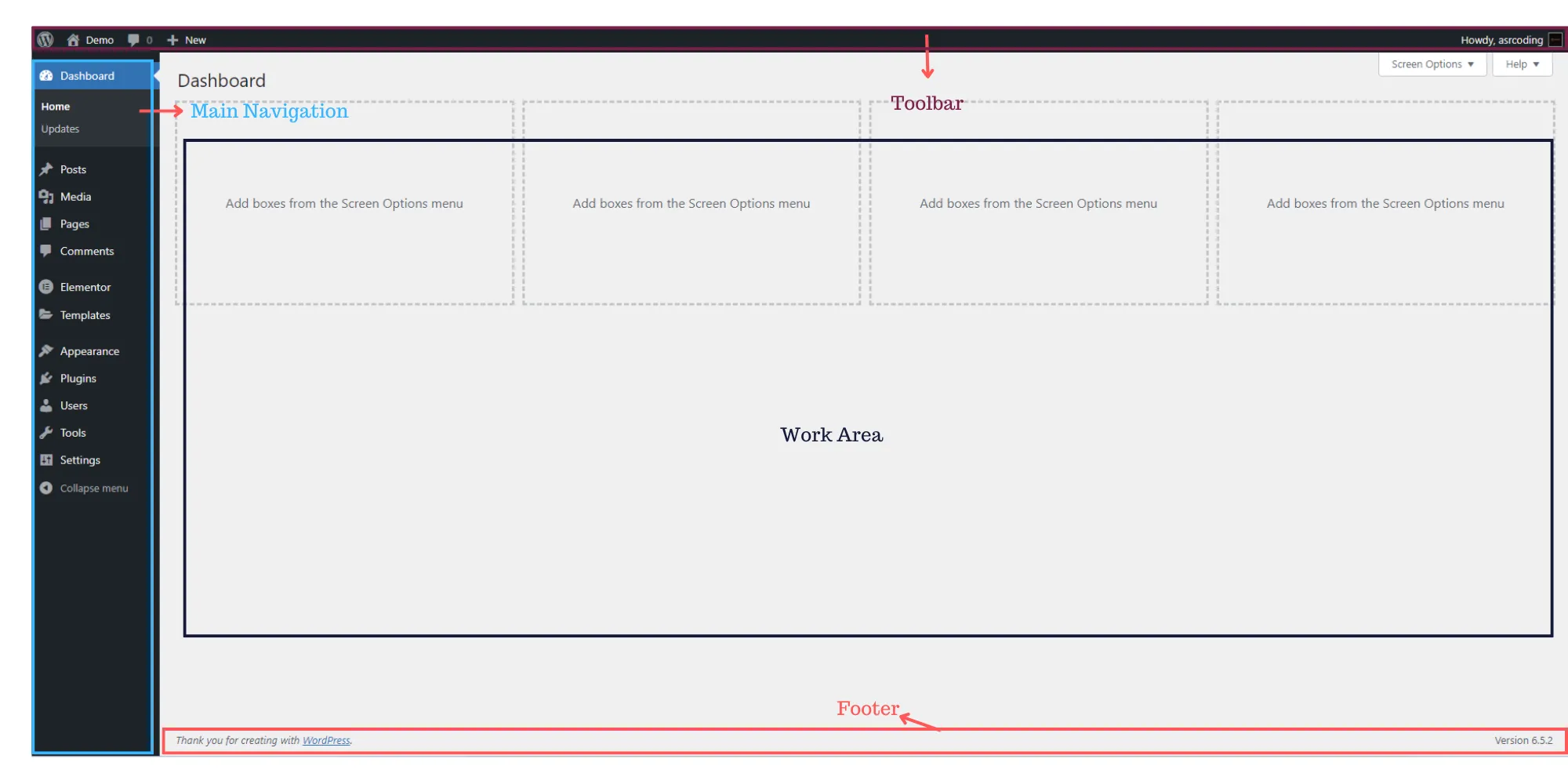
The WordPress dashboard serves as the control center for your website, allowing you to create, edit, and manage your content with ease. Let’s break down its key components:
1. Toolbar:
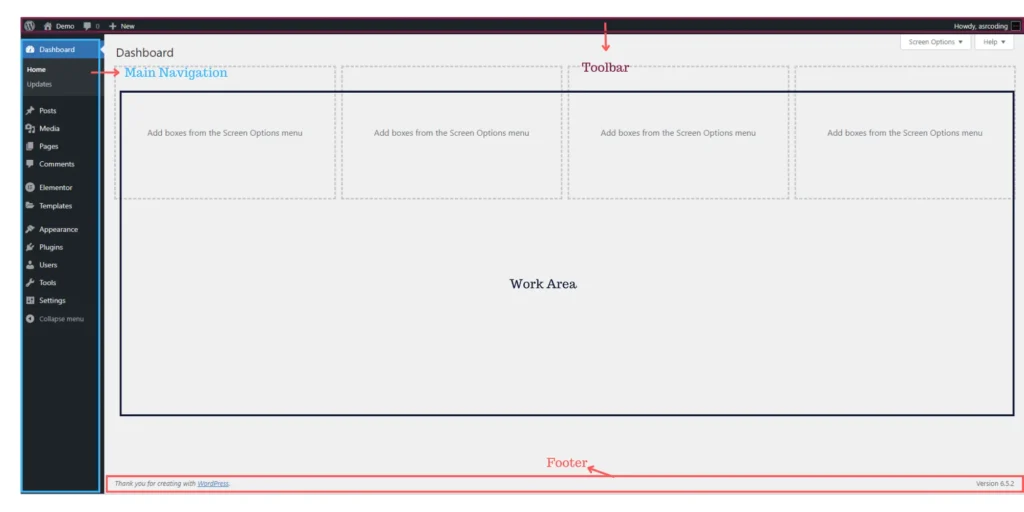
The Toolbar is your handy navigation menu located at the top of the screen. It provides quick access to essential functions such as creating new posts, managing comments, and viewing your site’s front end. Simply hover over each item to reveal additional options, making it easy to perform various tasks without navigating away from your current page.
2. Main Navigation Menu:
Located on the left side of the screen, the Main Navigation Menu categorizes administrative functions into easily accessible sections. From creating posts and pages to managing media and comments, you’ll find everything you need right at your fingertips. Don’t forget to explore the sub-menus for more specific options related to each category.
3. Work Area:
The Work Area is where the magic happens. Here, you’ll create and edit your content, configure settings, and perform other administrative tasks. Whether you’re writing a new post, uploading media, or tweaking plugin settings, the Work Area provides all the tools you need to get the job done efficiently.
Related Topics:
What is SEO? Why it is important for businesses!
Looking for a Side Job? Use Your Sales Skills!
4. Footer:
Last but not least, the Footer contains some useful information and links. You’ll typically find links to WordPress.org, thanking you for using the platform, along with the version of WordPress you’re currently using. These details can come in handy for troubleshooting and ensuring compatibility with plugins and themes.
FAQs: WordPress Dashboard Tutorial for Beginners 2024
Q: How do I access the WordPress dashboard?
A: To access the WordPress dashboard, simply log in to your WordPress site using your username and password. Once logged in, you'll be taken directly to the dashboard where you can begin managing your site.
Q: Can I customize the WordPress dashboard?
A: Yes, you can customize the WordPress dashboard to suit your needs. You can rearrange widgets, add or remove menu items, and even change the color scheme to personalize your dashboard experience.
Q: Is the WordPress dashboard user-friendly for beginners?
A: Absolutely! While the WordPress dashboard may seem overwhelming at first, it's designed to be user-friendly for beginners. With a little practice and guidance, you'll be navigating the dashboard like a pro in no time.
In conclusion, mastering the WordPress dashboard is essential for effectively managing your website. By familiarizing yourself with its key components and following this comprehensive tutorial, you’ll be well on your way to success in 2024 and beyond. Happy WordPressing!

Website Design for Dry Cleaners in Atlanta, GA

Website Design for POSH Business in Mumbai, India
Website Design for Dry Cleaners in Atlanta, GA
Website Design for POSH Business in Mumbai, India

Home Improvement Website Design in Mumbai, India

Jewelry Website Design & Development Agency

Nivoda Jewelry Builder Website Development

Website Design for CA Firms in Oslo Norway

B2B eCommerce Website for $1,000: What Can You Build?

Web Design for Lawn Mowing Service in Chicago, IL

Website Design for Veterinary Clinic in San Jose CA